
Credit Card USBs: A Musician’s Guide to Merch That Wows
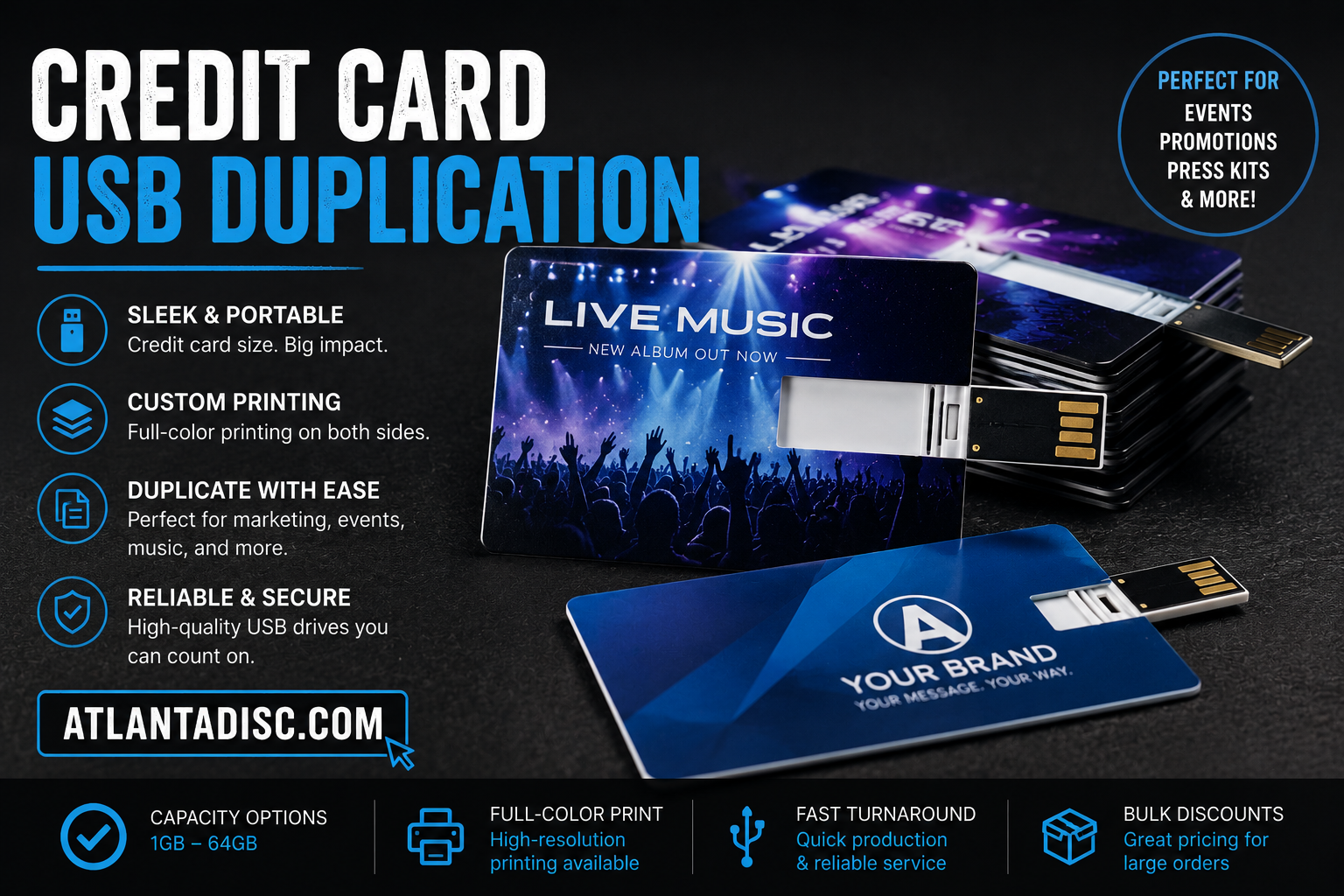
You’re getting ready for a show, a release party, or a Sunday distribution table. You’ve got music, message, and artwork ready. The weak point is the format.
A burned CD in a clear sleeve still works for some audiences, but it rarely feels special now. A plain download card is cheap and easy, but it can also feel disposable. If you want a physical item that feels modern, carries real content, and still fits in a wallet, credit card usbs are one of the smartest options on the table.
For indie artists, DJs, podcasters, and churches, the appeal is simple. You can hand someone a polished piece of merch that looks like a premium card, not a giveaway trinket. It can hold your album, sermon series, lyric sheets, photos, videos, and a link to your streaming pages in one format that’s easy to carry.
More Than Just a Flash Drive
At a merch table, people make snap decisions. They look at the shirt. They glance at the CD. They ask how much. Then they move on.
A credit card usb changes that interaction. It slows people down for a second because it doesn’t look like the usual merch item. It looks closer to a branded pass, a membership card, or a premium collectible. That matters when you’re trying to stand out in a room full of familiar stuff.

Musicians and churches usually don’t need another gimmick. They need merchandise that feels worth buying. That is the actual benefit here. You’re not just selling storage. You’re selling a physical experience that feels more current than a jewel case and more substantial than a paper card with a code on it.
Why the format gets attention
The shape does part of the work for you. It fits naturally into a wallet, so buyers don’t treat it like clutter. It also gives you a large printable surface, which is a huge advantage if your artwork is part of your brand.
There’s a reason this format stuck. Credit card USB flash drives rank among the top best-sellers in the custom USB market, with over 70% of promotional USB sales in major markets featuring slim or card-shaped form factors due to their high portability and branding potential. Adoption also exceeds 40% in music promotion bundles, according to USB Company’s write-up on credit card USB benefits.
Practical rule: If the product looks collectible, people are more likely to keep it. If they keep it, they keep your brand.
Where they work best
This format makes the most sense when the content itself has value beyond a standard stream.
- Artists with bonus content: Add the album, backing tracks, artwork, behind-the-scenes clips, and a thank-you note.
- DJs and mixtape creators: Put the main mix on the drive, then add drops, cover art, and flyer files.
- Churches and ministries: Bundle sermon audio, study guides, event photos, and welcome material for new members.
- Event promoters: Use them as premium handouts for talent packs, sponsor kits, or press materials.
When the product is done right, the buyer doesn’t see “flash drive.” They see a polished release.
Understanding the Tech in Your Wallet
You hand a fan a card at the merch table, or drop one into a church welcome packet, and the first question is simple. Will this thing work when they get home? That depends less on the print design and more on the hardware choices inside the card.

A credit card usb uses the same core parts as any other flash drive. You still have storage memory, a controller chip, and a connector. The difference is how those parts are packed into a flat body that stays close to standard card dimensions instead of a stick format.
The Internal Components
Three hardware choices affect your project more than anything else:
- NAND flash memory decides how your files are stored.
- The controller chip affects read and write behavior.
- The connector setup decides what your buyers can plug into right away.
For musicians and churches, the connector choice causes the most trouble. A drive that works fine on a laptop might be useless for someone trying to load files on a newer phone or tablet. Some card models solve that with dual connectors, which can reduce support headaches if your audience uses a mix of older computers and newer USB-C devices.
Physical size matters too, but mostly for durability and fit. Standard payment card sizing is widely recognized at 85.6mm x 53.98mm, and many credit card USBs stay close to that footprint while adding extra thickness to house the hardware.
Thin does not mean cheap. Cheap means cheap.
Flat drives get dismissed because they look delicate. I would not assume that. I would assume the opposite problem. Buyers often choose the thinnest, lowest-cost sample without checking the shell quality, connector hinge, or how the card flexes in a wallet.
Build quality is where the price gap starts to make sense. Flashbay’s Alloy product details describe a metal-bodied card-style drive with a slim profile and a recycled plastic inner shell. That is the kind of spec sheet worth reading because it points to the things that affect real use: shell material, wear over repeated writes, and how the drive handles daily carry.
That doesn’t make every premium sample the right buy. If you are selling deluxe album bundles or handing these out at a conference, paying more for a stronger shell is usually justified. If you are doing a small free giveaway run, you may decide a lighter build is acceptable.
Here’s a closer look at the form factor in action.
What matters before you place the order
Focus on use cases, not spec-sheet bragging.
If your audience is plugging these into laptops at home, standard compatibility is usually enough. If they are likely to use car stereos, DJ gear, church media booths, or older office machines, test a sample first. Those devices can be picky about connector fit, power draw, or file system formatting.
That one step saves money. A sample test tells you more than a long product page ever will.
My rule for first runs is simple. Buy one or two samples, load the final files, and test them on the exact devices your audience uses. If the drive passes that test, you can order the full batch with confidence.
Choosing Your Physical Media Format
You don’t choose physical media in a vacuum. You choose it based on what you’re selling, who you’re selling to, and how much effort you want to put into presentation.
For some releases, a CD still makes sense. For others, a download card is enough. But if you want a format that feels premium without becoming awkward to carry, credit card usbs often land in the sweet spot.

Physical Media Smackdown Which Format is Right for You?
| Feature | Credit Card USB | Standard USB Stick | CD / DVD | Download Card |
|---|---|---|---|---|
| Perceived value | Feels premium and modern | Useful, but often generic | Familiar, collectible for some fans | Usually lowest perceived value |
| Branding space | Large full-face design area | Limited surface area | Front print plus insert options | Small card area |
| Portability | Fits in wallet | Fits in pocket or bag | Case takes more space | Fits in wallet |
| Content flexibility | Audio, video, photos, PDFs, links | Audio, video, photos, PDFs, links | Mostly audio or video disc content | Usually points to online content |
| Compatibility | Strong on computers, newer devices if connector setup is right | Strong on computers | Depends on whether buyers still have disc drives | Depends on internet access and link behavior |
| Merch-table impact | High | Medium | Medium to high if packaging is strong | Low to medium |
| Best use | Deluxe merch, promo kits, church media bundles | Utility handouts, simple file delivery | Traditional album sales, collectors | Low-cost distribution and lead capture |
When a CD still wins
A CD can still be the right answer if your audience expects one. That’s common with legacy fan bases, some gospel audiences, and buyers who want a signed physical release they can shelve.
CDs also force simplicity. Audio goes on the disc. The package tells the story. There’s less temptation to overstuff the product with random files.
When a standard USB stick makes more sense
A regular stick drive is better when branding isn’t the priority. If you’re handing media kits to venues, sponsors, or press contacts, a standard USB can do the job with less concern about visual presentation.
It also works well for rougher handling. Some artists use stick drives for internal use, backing tracks, or file transfer between studio and stage. That’s different from fan-facing merch.
If the buyer is supposed to admire it, the card format has an edge. If the buyer is just supposed to use it, a stick drive may be enough.
When a download card is enough
A download card is hard to beat on simplicity. It’s light, cheap to hand out, and easy to bundle with another item. For many releases, though, it doesn’t feel like merchandise. It feels like a shortcut.
That’s fine when your main goal is traffic. It’s weaker when your main goal is to sell a physical object with emotional value.
The practical decision
Use credit card usbs when these conditions are true:
- Your artwork matters: You want a large print area to show it off.
- Your content goes beyond audio: You’re including video, photos, PDFs, or extras.
- You need portability: Fans, members, or attendees should be able to keep it in a wallet.
- You want a premium merch feel: The format needs to look like a finished product, not an afterthought.
Don’t use them just because they look cool. Use them when the format matches the release.
Nailing the Technical Details
The easiest way to ruin a good merch idea is to treat file prep like an afterthought. I’ve seen artists spend real money on a nice-looking card, then load it with messy folders, wrong formats, or files that fail on half the laptops in the room. Fans rarely blame the file system. They blame the product.
Get the technical side right before you approve the run.
Choose capacity from the finished deliverables
Start with the actual package you plan to load. An album in MP3 or WAV, a PDF lyric booklet, a few photos, video clips, sermon notes, or a welcome message all add up differently. Capacity should follow the file set, not the other way around.
For a music release, the common mistake is paying for far more storage than the bundle needs. For a church, the mistake is often the opposite. A weekly message archive, volunteer documents, and kids or small-group resources can fill a drive faster than expected.
Leave some headroom, but don’t buy storage for the fantasy version of the project. Buy for the release you are shipping.
Speed matters most during duplication
Your customer may never ask whether the card uses USB 2.0 or USB 3.0. You will care when you are loading dozens or hundreds of units.
If the content is mostly audio, PDFs, and artwork, standard speeds are usually fine. If you are adding video, multitracks, or a big media library, slower write speeds turn loading day into a slog. That can matter more than people expect on a small indie run, especially if you are hand-loading cards in-house instead of paying for factory preloading.
The practical question is simple. How long can you afford to spend filling drives?
Format for broad compatibility
For mixed audiences, exFAT is the safest default, as noted earlier. It works well across current Mac and Windows systems and is usually the least troublesome choice for projects that need to open without extra instructions.
Avoid getting clever here. A fan should not need to troubleshoot your merch table purchase. A church member should not need a volunteer to explain why the files open on one computer but not another.
Use a loading workflow you can repeat
Set up one clean master version, then use the same process every time:
- Build a final master folder. Include only approved audio, video, PDFs, artwork, and any shortcuts or start-here files.
- Clean up file names. Make them readable and consistent. Remove draft labels, version clutter, and duplicate exports.
- Format the drive before loading. Use the same format across the whole run.
- Load from the master folder only. Don’t drag files in from random desktops or old project folders.
- Test on more than one device. Open the card on Mac and Windows. If phone use matters, test that too.
- Check files directly from the USB. Play the audio, open the PDF, and click through the folders without copying everything to the computer first.
That last step catches a lot of headaches.
Set up the folder structure like a finished product
A credit card USB should feel organized the moment it opens. That means the buyer sees a clear set of folders or, better yet, a simple top level with obvious labels.
For an album, keep it tight. Music, booklet, bonus video, photos. For a church resource card, label by purpose, not by department jargon. Sermons, study guides, kids resources, volunteer materials is better than admin-style folder names that only make sense inside your team.
A neat directory makes the card feel intentional. A cluttered root folder makes it feel homemade in the wrong way.
Avoid these production mistakes
- Loading huge raw session files when the buyer only needs finished tracks or selected stems
- Testing one sample unit once and assuming the whole run is fine
- Mixing final content with drafts such as “final_v3” or “use_this_one”
- Changing folder structure halfway through duplication so some cards match and others do not
- Forgetting a simple readme or start-here file when the project includes a lot of extras
Technical prep is not the glamorous part of merch. It is the part that decides whether the product feels polished once it leaves the table.
Making Your Credit Card USB Unforgettable
A fan buys your USB after the set, slips it into a wallet, and pulls it back out a month later. If the card still looks sharp and instantly tells them what it is, you did the job right. If it looks crowded, generic, or hard to read, it turns into throwaway swag.

The win here is not technical. It is memorability. Credit card USBs give musicians and churches more printable space than a standard flash drive, so the design has to carry real weight. I tell first-time clients to treat the card like a miniature album cover or event handout that happens to store files.
Design for real use, not just mockups
A polished screen mockup can hide bad decisions. Printed cards expose them fast.
Small text disappears. Low-resolution art looks soft. Busy backgrounds fight with the title. The connector cutout can chew into your layout if nobody planned for it. Ask your supplier for the exact print template and build your artwork around the safe area, not around a flat rectangle from a Canva draft.
Keep the front focused. One image. One title. One name people should remember.
Pick the card’s main job
Many projects go sideways because teams try to make one card serve five purposes. Merch item, business card, donor piece, event archive, QR portal. That usually produces a crowded design with no clear message.
Choose the primary role first.
- For an album release: Put the artwork, artist name, and release title first.
- For church media: Lead with the sermon series, conference name, or ministry title, plus the date if people will store multiple cards.
- For fundraising or follow-up: Give the QR code and call to action enough room to be used.
- For limited runs: Add edition numbering or a signature area only if someone values that detail.
If the card needs to do more than one job, split those jobs by side. Front for identity. Back for details.
Use both sides with discipline
The back side is useful, but it is not a dumping ground.
A track list can work. A short welcome note can work. A single QR code with one clear action can work. Five social handles, two logos, a website, an email, a phone number, and a paragraph of copy usually do not.
For artists, the back is often best used for track names or one clean prompt such as scan for tour dates. For churches, it works well for a welcome message, service times, or a simple next step such as scan for study guides.
Watch the trade-offs
Full-bleed art looks strong, but it can hurt readability if the title sits on top of a detailed image. Matte finishes feel refined, but some dark designs lose contrast. Minimal layouts look expensive, but only if the typography is solid.
That is the practical balance. Strong art gets attention. Clear information gets the card used.
Before you approve final artwork, print it at actual size on paper. Put it on a table. Hold it at arm’s length. Hand it to someone who has not seen the design before and ask one question: “What is this?” If they cannot answer in a second or two, simplify it.
Common mistakes that make the card feel cheap
These are the ones I see most on first runs:
- Cramped text that reads fine on a monitor and fails in print
- No visual hierarchy so the viewer does not know what to read first
- QR codes placed over textured artwork that hurts scanning
- Connector placement ignored until the final proof
- Brand mismatch between the USB, the album art, and the merch table setup
The best card usually feels restrained. It knows what matters and leaves the rest off.
A good credit card USB does not just store your content. It gives the buyer one more reason to remember the release, the event, or the message after they get home.
How to Package and Present Your USBs
The drive matters. The handoff matters too.
When someone buys merch after a set or picks up media at a church table, they’re reading the whole presentation. A loose drive slid across the table feels unfinished. A simple package makes the item feel intentional.
Three packaging approaches that work
A clear sleeve is the practical budget option. It protects the printed surface, keeps fingerprints down, and still lets the design show. For artists selling at shows, this is often enough.
A printed cardboard jacket gives the item a stronger retail feel. It works well when you want room for credits, track names, a ministry message, or event details without crowding the card itself.
A tin or rigid collector package is for special editions. It’s not necessary for every release, but it can make sense when the merch bundle is positioned as premium.
Match the package to the story
If the release is raw, direct, and street-focused, overpackaging can hurt the vibe. A clean sleeve may fit better than a polished gift box.
If the release is formal, commemorative, or church-centered, the package can help communicate care and permanence. People notice when the presentation feels thought through.
Here’s the practical filter I use.
- For everyday merch sales: Keep it light and fast to hand out.
- For donor packs or church gifts: Add a printed insert or jacket.
- For collector editions: Use packaging that justifies the premium feel.
The package should support the product, not distract from it. If it takes too long to explain at the table, it’s probably too complicated.
Don’t forget the handoff
Presentation is also about how you talk about it. Don’t say, “It’s just a USB.” Say what’s on it.
Tell the buyer it includes the album, video, bonus photos, or sermon archive. Give them the reason it’s worth owning. The more specific you are, the easier the sale becomes.
Your Next Steps to Awesome Merch
Credit card usbs work best when you treat them like a release format, not a novelty. They need the right content, the right file setup, the right artwork, and the right presentation. When those pieces line up, they feel modern, useful, and collectible in a way that few low-bulk merch items do.
They also come with real trade-offs. Compatibility can vary on older hardware. Durability depends a lot on build quality. And if the files are loaded carelessly, even a beautiful card feels amateur fast.
Industry data on real-world failure rates during wallet storage or physical wear is still minimal, so the safest move is practical rather than theoretical. Choose a reputable supplier and follow careful data-loading and handling practices, which is the key guidance reflected in this discussion of durability and compatibility concerns.
Final order checklist
Before you place the order, run through this list:
- Define the purpose: Decide whether this is merch, promo, ministry distribution, press material, or a collector item.
- Build the content set: Include only the files that add value. Album, sermons, video, photos, PDFs, and links should feel intentional.
- Choose the connector style carefully: If your audience uses newer phones and laptops, broader compatibility matters.
- Format for exFAT: This is the safe default for mixed Mac and Windows use.
- Test a sample unit: Open it on the devices your audience is most likely to use.
- Design with the physical card in mind: Use a proper template and leave room for the connector area.
- Keep the print clean: Use high-resolution artwork and a readable QR code if you add one.
- Pick packaging that fits the release: Sleeve, jacket, or premium case should match the story you’re telling.
- Write a simple handoff pitch: Tell people what’s on the drive in one sentence.
- Order the right quantity: Don’t let storage hype or packaging excitement push you into an oversized first run.
A good first run is rarely the flashiest one. It’s the one you can explain easily, sell confidently, and deliver without headaches.
If you’re ready to turn your release into a polished physical product, Atlanta Disc can help with short-run USB projects, music media, packaging, and print support for artists, DJs, churches, and indie labels. They handle quantities from small runs up to larger campaigns, which makes them a practical option when you want professional merch without overordering.