
Compact Disc Manufacturing: A Complete Guide
You’ve finished the songs. The mixes are approved. The master files are sitting in a folder on your laptop with names like FINAL-final-2 and USE-THIS-ONE. Now comes the part that can feel oddly unfamiliar: turning those files into something people can hold, sign, sell at the merch table, or hand to a church member after a service.
That shift from digital to physical is where many creators get stuck. Not because compact disc manufacturing is impossible to understand, but because creators typically encounter it only when they’re under pressure. Release date is coming. Artwork still needs work. You’re trying to guess how many copies you need. And every choice seems connected to cost, quality, and turnaround.
A CD project goes more smoothly when you know what happens after you upload your audio. You don’t need to become an engineer, but you do need enough working knowledge to make smart decisions. That means understanding the difference between duplication and replication, knowing how your files should be prepared, and choosing packaging that fits your audience instead of just looking good in a mockup.
Think of this like a plant tour with practical side notes. I’m going to walk you through the full process, but with your real-world questions in mind: How many should I order? What affects quality? Where do projects get delayed? What should I spend money on first if my budget is tight?
Your Music is Ready So What’s Next
The first thing to know is simple. A CD order is not one decision. It’s a chain of smaller decisions that affect each other.
If you’re an indie band, rapper, church, DJ, or small label, you’re usually balancing three things at once: how many units you need, how fast you need them, and how polished the final package should feel. Miss one of those, and the whole project gets harder. Order too many and boxes sit in a closet. Order too few and you run out at the exact moment people want them. Rush the artwork and the disc may sound great but look unfinished.
Physical media still matters because it does a job streaming can’t do. It gives fans and supporters an object. At a show, that object becomes merch. In a ministry setting, it becomes something easy to hand out. For a small business or event organizer, it becomes a leave-behind that doesn’t disappear into a feed.
Start with the end use
Before you compare prices, answer these questions:
- Sales use: Are these discs mainly for merch tables, direct mail, church distribution, promo kits, or a release event?
- Audience habits: Will your buyers value premium packaging, or do they mainly want an affordable copy of the music?
- Timeline pressure: Do you need discs quickly for a specific date, or can you allow more time for a fully manufactured run?
- Inventory comfort: Would you rather test demand with a smaller batch first, then reorder?
Practical rule: If you can clearly describe who the discs are for and where they’ll be handed out or sold, most production decisions get easier.
Know what manufacturers need from you
A manufacturer can only move as fast as your files allow. Most delays happen before production even starts. Audio may be in the wrong format. Artwork may not match the template. Track names may still be changing. Rights for sampled content may still be unresolved.
That’s why smart creators treat compact disc manufacturing like the final stage of the album project, not an afterthought. The music may be done, but the product isn’t finished until the audio, artwork, print decisions, and packaging all line up.
Replication vs Duplication The Two Paths of CD Production
Your album is finished. The release date is getting close. Now a manufacturer asks a question that catches a lot of artists off guard: do you want duplicated CDs or replicated CDs?
That choice shapes cost, speed, minimum quantity, and how much flexibility you keep if something changes at the last minute.
Here is the plain-language version. Duplication writes your music onto recordable CD-R discs. Replication creates pressed discs from a production master, with the data formed during manufacturing. If you are planning a short run, that difference matters less as a piece of trivia and more as a budget decision.
A simple way to separate the two
Duplication works like recording onto a prepared blank. The disc already exists, and the music is added to it.
Replication works like a printing press that first has to be set up. Once that setup is complete, the plant produces pressed discs built from the approved master.
Artists often get stuck because both options can result in a professional-looking product. The better question is not which method sounds more official. The better question is which method fits your quantity, deadline, and risk tolerance.
CD Replication vs. CD Duplication at a Glance
| Attribute | CD Duplication (Short-Run) | CD Replication (Bulk) |
|---|---|---|
| Process | Audio or data is written onto pre-made CD-R discs | Audio or data is formed into the disc during manufacturing from a master |
| Best fit | Smaller projects, test runs, events, local merch, ministry distribution | Larger runs, retail-style releases, broad distribution |
| Setup | Faster to begin because it does not require glass mastering and stamper creation | More setup because it requires mastering and stamper production |
| Flexibility | Easier to update between runs | Better suited when the content is finalized and stable |
| Turnaround | Often chosen when speed matters | Often chosen when scale and pressed-disc production matter |
| Packaging options | Can still look professional with printed discs and finished packaging | Can also be paired with full retail-style printing and packaging |
When duplication is the smarter choice
Duplication usually makes sense for creators who need a modest quantity and want to avoid tying up money in boxes of unsold inventory.
A band heading into a regional weekend run, a church preparing a sermon series, or an independent artist testing a new city can all benefit from starting small. If the discs sell quickly, you reorder. If the artwork or track list still needs work, you have room to adjust before placing a larger order.
That flexibility is a key advantage. You are buying information along with discs. A short run shows you whether people want jewel cases or wallets, whether the cover grabs attention at the merch table, and whether your audience is requesting physical copies.
When replication is the better fit
Replication is the standard choice for a larger, fully locked release. If your audio is approved, your artwork is final, and you expect to sell or distribute enough copies to justify factory setup, replication often gives you the better production path.
Pressed CDs are what many artists mean when they picture traditional manufacturing. They are made through a more involved setup process, so they usually make more sense once your project has stopped changing. If you are sending inventory to multiple events, retailers, or fulfillment channels, replication can be the more practical long-term choice.
Short version: duplication favors flexibility. Replication favors scale.
The decision artists actually need to make
Many creators ask, “Which one is better?” That question leads people in the wrong direction.
Ask instead:
- How many copies can I realistically sell or hand out in the first run?
- Is my release date close enough that speed matters more than factory setup?
- Could the audio, sequencing, or artwork still change?
- Am I comfortable paying more up front to lower the unit cost on a larger run?
If you are unsure, start with a practical scenario. A 100-disc merch test and a 2,000-disc album launch are different jobs. They should not use the same decision process.
Practical rule: Choose duplication when you need a smaller batch, a faster start, or room to revise. Choose replication when the project is final and the quantity is high enough to justify full manufacturing setup.
Inside the Factory The CD Replication Process Explained
Your band has approved the masters, the track order is locked, and release day is on the calendar. You send the project to a plant and, for a short time, it can feel like the process disappears behind a factory door.
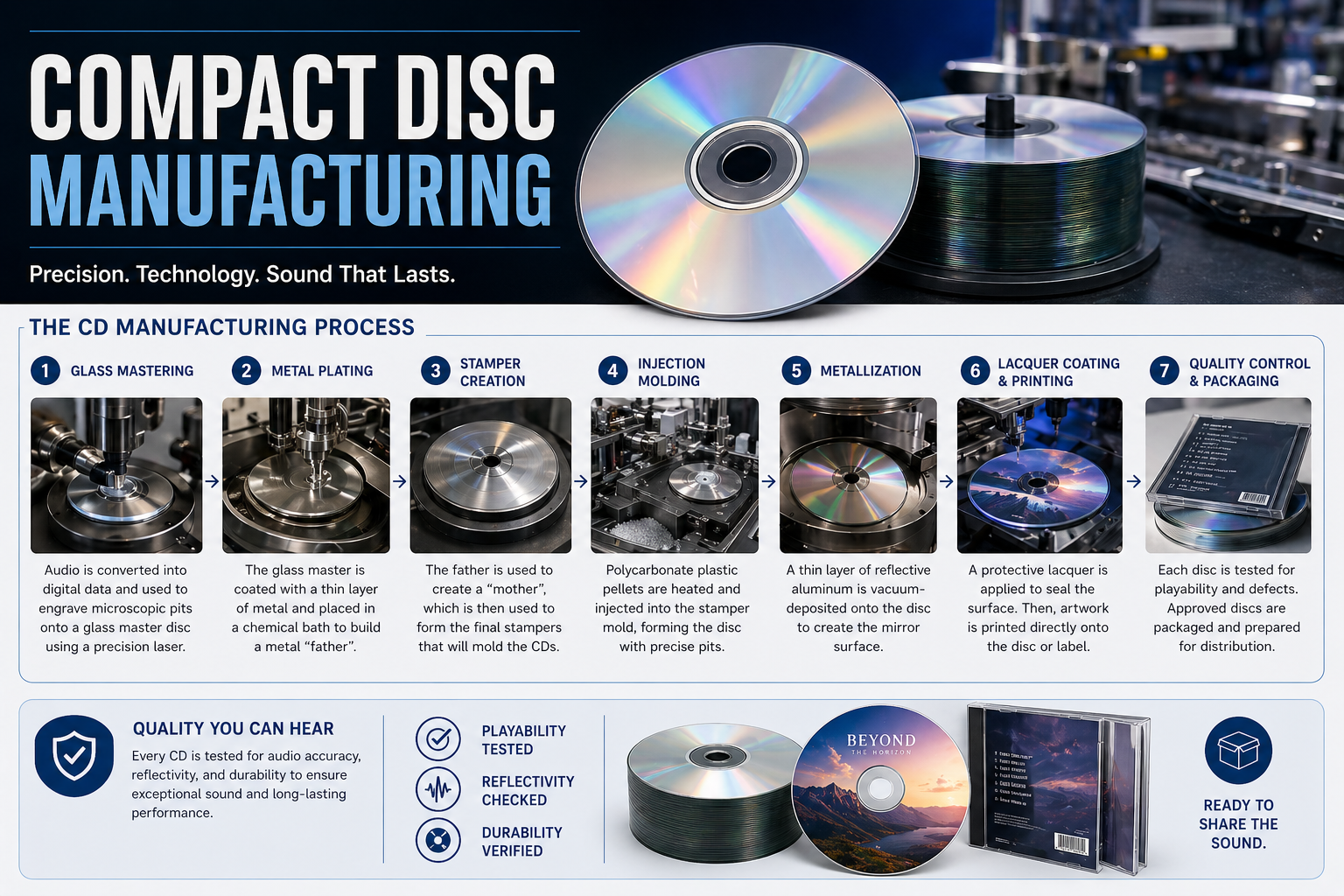
What happens next is very physical. Your audio becomes a pattern in plastic, metal, and protective coating. Once you understand that sequence, you can judge whether replication fits your quantity, timeline, and budget, especially for a short run where setup costs matter more.

Step one starts with an approved master
A replication plant does not “clean up” a project during manufacturing. It builds from the master you approved.
That point matters for creators watching costs. If your spacing, CD-Text, ISRCs, or final sequence might still change, fix those items before the job enters factory setup. Replication is built to repeat one finished version accurately across hundreds or thousands of discs.
Step two creates the glass master and stamper
The first major factory step is glass mastering. A laser writes the disc data onto a polished glass surface coated for that purpose. That glass master is then used to create a metal stamper through electroforming.
The stamper works like a mold used over and over in production. It carries the microscopic data pattern that will be pressed into each disc. This is one reason replicated CDs have startup costs that duplicated discs do not. The plant has to build the tooling before it can make saleable copies.
If there is one idea to keep in mind, it is this: errors at the master stage become repeated errors.
Step three molds the clear disc
With the stamper prepared, the plant moves to injection molding. Molten polycarbonate is forced into a mold, where the disc takes shape and the encoded pattern is formed into the plastic. According to Wikipedia’s compact disc manufacturing overview, molding lines can produce 550 to 900 discs per hour per line, and each cycle takes about 3 to 5 seconds.
That speed surprises many artists on a first factory order. The slow part is not the plastic disc itself. The time and cost are concentrated in setup, approvals, printing, packaging, and scheduling the run.
For a short-run project, that distinction helps with planning. If you only need a modest quantity, the setup can be the deciding factor.
Step four adds the reflective layer
After molding, the disc is still clear plastic. A CD player cannot read it until the disc has a reflective surface.
The plant applies that layer during metallization, usually by sputtering aluminum in a vacuum chamber. Nordex Media’s manufacturing explanation notes that the aluminum coating is about 400 nanometers thick. Thin as it is, that layer gives the player’s laser something to reflect from during playback.
Step five protects the data surface
The reflective layer needs protection right away. A plant spin-coats the disc with UV-curable lacquer, then cures it to form a clear protective barrier. Nordex Media reports that this lacquer layer is typically 5 to 10 micrometers thick.
A useful comparison is a printed photo under clear varnish. The image is there, but it lasts because a protective layer sits above it. On a CD, that protection helps guard the metal layer against oxidation and handling damage.
Step six verifies that the discs meet spec
Quality control covers more than whether the music plays. The factory checks whether the disc was manufactured consistently enough to play well across different drives and survive normal handling.
That usually includes checks such as:
- Disc formation: The molded disc must have the correct shape and physical consistency.
- Reflective coverage: The metal layer must be even enough for reliable reading.
- Lacquer cure: The protective coating needs to bond and cure properly.
- Finished appearance: The printed face has to register correctly and match the approved art.
Artists often hear “factory quality” and assume the term refers only to audio. In practice, the plant is checking the object as a whole.
What this means for a real project
Replication makes sense once your release is stable enough to justify factory setup. You are paying for precision tooling, repeatability, and a finished product built in layers, not just a burned disc with artwork.
For creators planning a short run, this is the practical question: does your quantity justify that setup cost, or would a smaller duplicated run protect your budget while you test demand? Knowing how replication works helps you answer that question before you commit money to the wrong production path.
Bringing Your Art to Life A Guide to On-Disc Printing
You approve the master, the discs come off the line, and then someone in your band asks a fair question. What will people see when they pick this up? The answer is the disc face, and it does more work than many artists expect. It is often the first physical part of the release that a listener handles, so the printing choice should match the kind of project you are making and the budget you are trying to protect.

For a short run, that decision matters even more. A design can look great on your laptop and still be the wrong fit for the printing method. Good manufacturing is partly about appearance, but it is also about choosing a process that gives you the look you want without paying for detail your artwork does not use.
Match the printing method to the artwork
At the plant, artists usually ask which printing method is “best.” The better question is which one fits the image on the disc.
- Silkscreen printing works well for bold, simple art. If your disc has a logo, strong typography, flat colors, or a limited palette, this method often gives a clean result.
- Offset printing suits art with more visual information. Photos, layered textures, gradients, and illustration-heavy designs usually reproduce better here.
- Digital printing can make sense for shorter runs, especially when you need flexibility or want to avoid the setup involved in press-style printing.
A simple way to judge it is to look at your artwork from arm’s length. If the design depends on crisp blocks of color, silkscreen is often enough. If it depends on subtle shading and image detail, offset or digital printing is usually the safer choice.
Design for a disc, not a phone screen
Disc art trips people up because the canvas is small, circular, and interrupted by a hole in the middle. It works more like a label on a record than a square social post. The center hub removes part of your design, the printable area has limits, and tiny text that looked fine on a monitor can disappear once it is printed on plastic.
That is why manufacturers provide templates. Use them early, not at the end.
A few habits save artists from expensive corrections:
- Build the file on the manufacturer’s template. The center hole, outer edge, and bleed area all affect what survives to the finished disc.
- Work in a print-friendly color mode. Screen colors and printed colors do not behave the same way.
- Keep small text to a minimum. Song titles, copyright lines, and catalog numbers need room to stay readable.
- Protect the hub area. Do not place a face, logo, or key text where the clear center will cut through it.
The strongest disc faces are usually the ones that respect the shape of the object. A compact disc gives you a circular stage, not a poster.
Choose detail level with your budget in mind
Short-run planning proves practical when pressing a few hundred discs for tour sales, merch table bundles, or a first test of demand. The smartest print choice is often the one that supports the release without turning the disc face into the most expensive part of the job.
For example, a punk EP with one-color art and a sharp logo may look better with a direct, simple print treatment than with a full-color approach the design does not need. A singer-songwriter album built around photography may justify the added detail of offset or digital printing because the image carries part of the album’s identity.
In other words, do not buy complexity just because it exists. Buy the finish that serves the music, the audience, and the quantity you are ordering.
A simple artwork approval routine
Before you approve the print file, check it in this order:
- Title and name accuracy. Confirm the artist name, album title, and any text printed on the disc.
- Readability. Shrink the proof on screen or print a paper mockup and make sure the main text still reads clearly.
- Center and edge placement. Look closely at the hub and the outer rim so no important element gets clipped.
- Visual consistency. Make sure the disc face matches the rest of the release artwork.
- Proof timing. Review the final file when you are fresh, not late at night after staring at it for hours.
A good on-disc print result is not about adding more. It is about making smart choices so the finished disc looks intentional, readable, and right for the scale of your project.
Choosing Your Album’s Look A Guide to CD Packaging
You have the master approved, the disc face looks right, and now a practical question decides how the whole release will feel in someone’s hands. A jewel case picked up at the merch table sends one message. A board wallet handed to a blogger or tucked into a mailer sends another. Packaging is the first physical cue your audience gets about the project, and for a short run, that choice affects cost, shipping, storage, and perceived value all at once.

Start with the job the package needs to do
Artists often start with appearance. That makes sense. Packaging is visual. But the better starting point is function.
Ask four questions first. Will you sell this at shows, mail it to press, bundle it with merch, or keep the price low for a short-run release? The answers usually narrow your options fast.
A package works like clothing for the album. Stage wear, rehearsal clothes, and travel gear can all look good, but each serves a different purpose. CD packaging works the same way.
What each format is good at
Jewel case
This is the standard hard plastic case many listeners still associate with a traditional album release. It protects the disc well, holds a booklet and tray card, and stacks neatly in boxes or on shelves. It is a safe choice if your audience expects a classic retail-style CD or if durability matters more than novelty.
Slim case
A slim case cuts down shelf space and weight. It is useful for promos, spoken-word releases, simple handouts, or projects where the goal is distribution more than presentation. You give up some booklet space, so it is less useful if your artwork or lyrics need room.
Digipak
A Digipak gives you more visual presence. The printed board panels can make a release feel closer to a small art object than a standard case. That can be a strong fit for an album where presentation supports the story, but it usually costs more than a plain jewel case and can scuff more easily during heavy touring.
Wallets and jackets
These are light, compact, and often budget-friendly for short runs. They are especially useful if you plan to mail copies, include CDs in crowdfunding rewards, or reduce plastic use. The tradeoff is protection. A simple sleeve does less to guard against rough handling than a case with a tray.
Match the package to the real-world use
The smartest choice is often the one that solves a practical problem.
If you are pressing a debut full-length and want a familiar store-shelf feel, a jewel case or Digipak usually makes sense. If you are making 100 to 300 copies for weekend shows, a wallet or jacket may leave more room in the budget for posters, shirts, or paid promotion. If you need to carry a box into three venues in one week, lighter packaging starts to look a lot more attractive.
That is where many short-run projects go off course. The artist buys packaging for the mockup, not for the way the release will travel, sell, and be stored.
Budget, shipping, and breakage all matter
Packaging cost is only part of the total. Weight affects shipping. Size affects how many units fit in your car, on your merch table, or in your closet. Material affects breakage rates and how the release looks after a few live dates.
A cracked jewel case can be replaced. A crushed printed wallet cannot be fixed as easily. On the other hand, a wallet can be cheaper to ship and easier to pack in bulk. There is no universal winner here. There is only the option that best fits your quantity, audience, and budget.
A simple way to decide
Use this quick guide if you are stuck between formats:
| If your priority is… | Packaging that usually fits |
|---|---|
| Traditional album presentation | Jewel case or Digipak |
| Premium merch-table feel | Digipak |
| Lowest-cost short run | Sleeve, wallet, or jacket |
| Lower plastic use | Eco wallet or eco jacket |
| Easy transport and storage | Slim case or wallet |
A quick visual example helps when you’re weighing presentation against practicality.
Mistakes artists notice after the boxes arrive
Regret usually shows up in practical ways.
- The package looked good online but felt too flimsy in person.
- The cost per unit pushed the release price higher than the audience would pay.
- The package took up more room than expected in storage or on the road.
- The artwork needed more panel space than the chosen format allowed.
- The release looked disconnected from the band’s posters, shirts, and online visuals.
One final test helps. Ask which package still makes sense after the first unboxing, the first shipping run, and the fifth show. That answer usually leads to a better decision than choosing the format with the flashiest mockup.
The Ultimate Ordering Checklist for Your CD Project
You have the masters back, the artwork looks close, and the release date is circled on the calendar. This is the point where small decisions turn into delays or a clean production run.
A good order is built before anyone clicks “submit.” At the plant, the jobs that move fastest are usually the ones where the band has already settled the audio master, the artwork, the rights, and the shipping plan. Everyone saves time, and you avoid paying to fix preventable mistakes later.

Start with the audio master
For an audio CD, file format is part of the manufacturing spec. Your CD master needs to be prepared to the Red Book audio standard noted earlier in this article. If your mastering engineer sent WAVs, DDP, streaming masters, and high-resolution files, ask one direct question. Which set is approved for CD production?
That one step prevents a common short-run problem. Artists often have several “final” versions sitting in one folder, and only one is intended for pressing.
Use this pre-order checklist
Before you request a quote or approve a proof, confirm each item below.
- Approved audio master: Confirm the final sequence, spacing, fades, and track start points.
- CD-ready delivery files: Make sure you are sending the version prepared for CD authoring, not a streaming or archive master.
- Final track list: Lock spelling, featured-artist credits, and track order before artwork is approved.
- Artwork files: Build print files from the manufacturer’s template so panel sizes, bleeds, and safe areas match the package you chose.
- Disc face design: Check that the on-disc print matches the package branding and leaves room for any required hub or mirror-band area.
- Credits and legal text: Review songwriter names, producer credits, copyright lines, and thank-yous carefully.
- Rights clearance: Confirm permission for samples, cover songs, photos, logos, and any artwork elements you did not create.
- Barcode or release identifiers: Have these ready if you plan to sell through retail, online distribution, or inventory systems.
- Packaging choice: Finalize this before the artwork is finished. A jewel case insert, wallet, and Digipak all need different layouts.
- Shipping plan: Decide where the order is going, who will receive it, and whether you need one shipment or split delivery.
A short-run project usually lives or dies on preparation. The manufacturing itself is repeatable. Last-minute changes are what create trouble.
Match the order to the real job the CDs need to do
Creators can save money without lowering quality. Ask what the discs are for.
If you need merch-table stock for a regional run, your best choice may be a smaller quantity with simpler packaging so you keep upfront costs under control. If the CD is being sent to press, venues, or backers, presentation may matter more than unit price. If you need them by a release show, schedule may limit your options before budget does.
Budget and timing work like two sides of the same production plan. A rush schedule can narrow packaging choices. A tighter budget can push you toward a shorter run or a simpler print setup.
For short-run orders, some manufacturers are set up for exactly that kind of project. For example, Atlanta Disc offers quantities from 25 to 5,000 units and a range of packaging formats, including jewel cases, Digipaks, Eco Jackets, and Eco Wallets. That makes it a relevant option for artists comparing practical short-run choices.
Order when the project is approved, not when everyone is tired of revising it.
Do one final proof check
Before you give final approval, hand the full proof set to one person who has not been staring at it for a week. Ask them to check track numbers, spine text, credits, and obvious print alignment problems.
Fresh eyes are useful for the same reason a test listen is useful. After enough revisions, bands stop seeing small errors that will be very obvious once the boxes arrive.
How to Choose the Right Manufacturer for Your Needs
Your files are approved, the release date is circled, and now one decision can either keep the project calm or turn it into a week of confusing emails. The manufacturer you choose will shape more than the discs. They will shape your timeline, your stress level, and how many problems get caught before production starts.
For a short-run project, the best fit is usually a company that works with short runs every day. A plant built around large label orders may still take your job, but its process may not be set up for smaller quantities, fast approvals, or hands-on guidance. That mismatch is where delays and misunderstandings often start.
Start by matching the manufacturer to your actual release plan.
If you need a small batch for shows, a preorder, or a first pressing to test demand, ask whether the company handles orders like yours routinely. If your project includes printed packaging, ask whether they produce that in the same workflow or send part of the job elsewhere. A manufacturer that can explain the full path clearly is easier to work with than one that gives you a price but leaves the process fuzzy.
What to evaluate first
Before comparing quotes, check the parts of the job that affect whether the order runs smoothly:
- Order size fit: Confirm that your quantity is normal for them, not a one-off exception.
- Approval process: Ask how they review audio, artwork, and packaging before production begins.
- Packaging options: Make sure they offer the format you want and can explain the tradeoffs in cost and turnaround.
- Communication: Pay attention to how they answer simple questions before you place the order.
- Shipping details: Ask how finished units are packed, labeled, and sent.
Those points sound basic. They are also where many projects succeed or stall.
Ask quality-control questions directly
A short-run order still needs consistent output. Your fiftieth disc should look and play like your first one, and printed pieces should line up the way the proof showed them. That is why quality control deserves plain, direct questions.
Ask things like:
- What parts of the job are handled in-house?
- How do you check print alignment and color before the full run starts?
- How do you confirm the master or audio files are correct before production?
- What happens if there is a manufacturing defect or shipping damage?
- Can you explain your reorder process if I need more later?
You are not looking for technical theater. You are looking for clear answers that show the company has a repeatable process.
A good manufacturer should be able to walk you through the job the way a plant manager walks a band through the line. First we verify the files. Then we prepare the print. Then we run proofs. Then production starts. If they cannot explain their own workflow in a simple way, it will be harder to trust the handoff points when your deadline gets tight.
If basic pre-order questions get vague answers, expect more confusion after payment.
Choose the partner that fits your project
Compact disc manufacturing is a production job, but for independent artists it is also a planning job. You are balancing budget, quantity, packaging, release timing, and the very real question of whether these CDs need to impress press contacts, sell at shows, or fulfill backer rewards. The right manufacturer understands that a short-run order is rarely just “print me some discs.” It is part of a release strategy.
That is also why the lowest quote is not always the lowest-cost choice. If poor communication leads to a missed deadline, a packaging mistake, or a reprint, the cheap option gets expensive fast.
Atlanta Disc is one example of a manufacturer that works with independent creators on short-run CD projects, including duplication, printing, and packaging. If you are comparing vendors, the useful question is not who will merely accept the order. It is who can help you choose the run size, package style, and production path that make sense for your goals and budget.