
What Is a Digipak CD? The Complete 2026 Guide
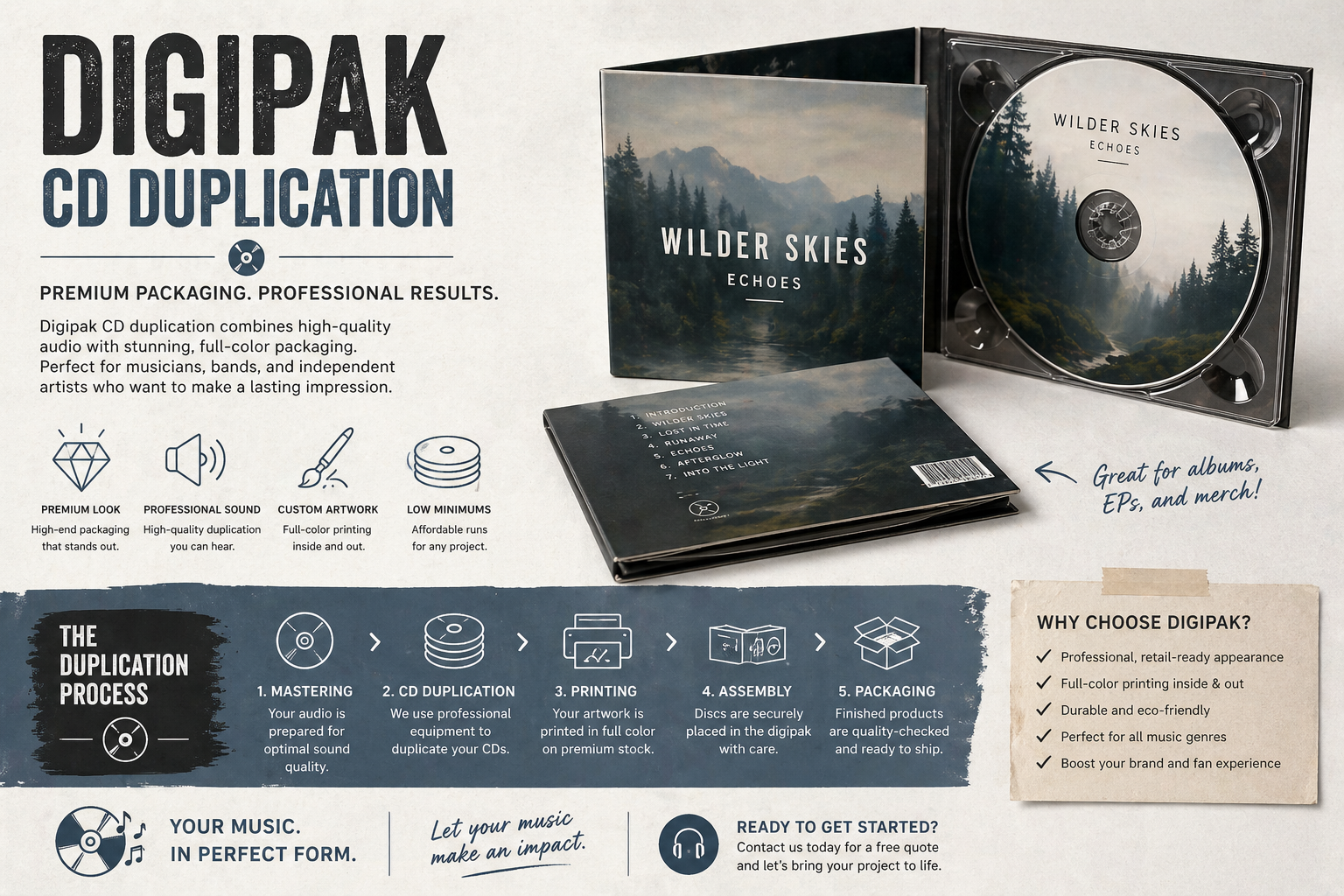
You’re probably in one of three spots right now. You’ve got music finished and need packaging that looks more serious than a paper sleeve. You’re pricing a short run and trying not to blow your budget. Or you’ve heard the term Digipak and want to know if it’s worth it for an indie release, mixtape, sermon series, or event CD.
That’s a smart question.
When people ask what is a digipak cd, they usually don’t want a dictionary answer. They want to know what it feels like in the hand, how it ships, what fans think when they open it, and whether it makes sense for a run of 25 to 5,000 units. That’s where the ultimate decision happens.
A Digipak sits in a useful middle ground. It gives you more visual impact than a basic wallet, and a more boutique look than a standard jewel case. But like every packaging format, it comes with trade-offs. If you’re selling at shows, mailing orders, or handing out discs after church services, those trade-offs matter.
The Anatomy of a Digipak CD
You approve your master, price out 300 CDs, and then hit the packaging question. The disc itself is simple. The package is where the budget starts to move.
A Digipak is a folded paperboard package with a plastic tray attached inside. In your hand, it feels closer to a small album cover than a hard plastic case. That mix of printed board and tray is the whole idea. You get room for artwork on the outside and secure disc holding on the inside.

The two main parts
First is the printed board. This is the wraparound shell that gets scored and folded into panels. Those panels form the front cover, back cover, spine, and inside areas where your art, credits, track list, photos, or message notes live.
Second is the tray. The tray is the molded plastic piece glued into one panel, usually on the inside right. It holds the CD by the center hub, the same basic way a jewel case does, so the disc stays in place without sliding around in a pocket.
If you are ordering a short run, this breakdown matters more than it sounds. More panels usually mean more printed area, more assembly, and a higher unit cost. For a church message series, a mixtape drop, or a 500-copy indie EP, that extra space has to earn its keep.
Terms you’ll hear at a duplication plant
A few production terms can sound more technical than they really are:
- Panel means one flat section of the printed board.
- Spine means the narrow folded edge that can carry the title.
- Tray means the plastic disc holder attached inside.
- Pocket or booklet slot means an added space for an insert.
The most common format is a 4-panel Digipak. It opens like a book and gives you four printable surfaces to work with. For a lot of short-run projects, this is the sweet spot. It gives you a front cover, back cover, and inside spread without pushing the package into deluxe territory.
A 6-panel Digipak adds another fold. That gives you more room for lyrics, thank-yous, sermon outlines, artist credits, sponsor logos, or photos from a live event. An 8-panel version gives you even more storytelling space, but it also makes more sense when the packaging itself is part of the sell.
Here is the practical way we explain it at a plant like Atlanta Disc. A 4-panel Digipak is often the budget-conscious choice for artists and ministries that want a polished look. A 6-panel or 8-panel version makes sense when the printed content helps you sell the project, explain the message, or create a stronger keepsake feel for the person opening it.
How the structure affects the finished product
Each part of the Digipak does a different job.
The board carries the visual identity. That is what fans see first on the merch table or what supporters notice when they pull it from a mailer. The tray handles disc retention. If the tray is placed well and bonded cleanly, the package feels solid and the disc removes with a familiar click.
That construction creates a useful middle ground for short runs of 25 to 5,000 units. You get more presentation than a simple sleeve, but you avoid the full plastic feel of a jewel case. For independent artists, DJs, and churches, that often translates into a package that looks serious without forcing every copy into the highest packaging tier.
Why the anatomy matters before you order
The number of panels affects design time, print cost, assembly, carton size, and sometimes postage. The tray affects durability and how the disc feels when someone opens the package. Even the spine matters, because once you stack copies at a table or on a shelf, a readable spine helps the release look finished.
So when someone asks what a Digipak CD is, the clearest answer is simple. It is a folded printed package with an attached tray, built to make the disc feel like a real release instead of just a burned CD in a cover.
For short-run work, that anatomy is not just technical detail. It is the reason one version fits your budget and another version fits your vision.
Digipak vs Jewel Case vs Eco-Jacket
Choosing packaging usually comes down to three options for short-run CD work. Digipak, jewel case, and Eco-Jacket. Each solves a different problem.
If you care most about shelf appeal, you’ll lean one way. If you care most about hard transit protection, you may lean another. If your budget is tight and you still want printed packaging, there’s a third path.

The quick side by side view
| Feature | Digipak | Jewel Case | Eco-Jacket |
|---|---|---|---|
| Material | Printed board with plastic tray | Hard plastic case | Printed paperboard sleeve |
| Look | Premium and book-like | Familiar retail look | Minimal and clean |
| Artwork space | Strong | Moderate with inserts | Good front and back area |
| Disc hold | Tray-mounted | Hub-mounted | Usually sleeve or slot based |
| Transit strength | Good, but tray attachment matters | Strong disc protection, brittle outer case | Basic |
| Environmental feel | Lower-plastic presentation | Most plastic-heavy feel | Most paper-forward feel |
| Typical fit | Releases that need presentation | Mail-order and standard retail style | Budget-conscious projects |
Digipak
A Digipak is the format people often pick when they want the CD to feel like merch, not just media. It looks custom even when the run is small. That matters for indie artists at the merch table and churches handing out a polished recording.
The trade-off is that the glued tray introduces one vulnerability. Some industry feedback notes that jewel cases may protect better in transit. In the source summarized by Vocal Media’s Digipak comparison, jewel case breakage rates are under 1 percent in high-volume shipments, while Digipaks can face a 3 to 5 percent tray detachment risk. If a large share of your sales will be mail orders, that’s worth taking seriously.
Jewel case
Jewel cases are old-school for a reason. They’re standard, familiar, and good at holding a disc securely. They don’t offer the same visual drama as a Digipak, but they still work well for catalog releases, promos, and projects where durability matters most.
The downside is obvious the second you pick one up. They can crack. Hinges break. The case looks more utilitarian than artistic. For some projects, that’s fine. For others, it undercuts the presentation.
If most of your CDs are going into padded mailers and traveling across the country one order at a time, jewel cases still deserve a hard look.
Eco-Jacket
An Eco-Jacket is the simpler cardboard option. No plastic tray. Less structure. Lower material complexity. It’s often chosen by artists who want a clean printed package and need to keep costs under control.
It won’t usually feel as deluxe as a Digipak, and it won’t protect like a jewel case. But for hand-to-hand distribution, conference giveaways, sermon CDs, and lower-cost merch tables, it can be a practical fit.
How to choose based on real use
Use a Digipak if fan perception and artwork matter most.
Use a jewel case if transit protection is your top concern.
Use an Eco-Jacket if budget and simplicity matter more than presentation extras.
That’s the ultimate consideration. Not which package is “best,” but which one fits how you’ll sell and ship the disc.
Exploring Digipak Variations and Customization
You’re ordering 100 CDs for a release show, or 500 for a church conference, and the artwork is finally done. Now the packaging choice starts to affect real numbers. A larger Digipak can look impressive, but it also uses more printed board, takes longer to set up in design, and adds a little more bulk to every box you ship. For short runs, those trade-offs matter.
The good news is that Digipaks give you room to match the package to the project instead of paying for space you do not need.

Choosing your panel count
A 4-panel Digipak is the standard starting point for a reason. It gives you a front cover, back cover, and inside spread without turning the package into a bigger print project than it needs to be. For an EP, mixtape, sermon series, live set, or first album, this format usually covers the basics cleanly and keeps the budget under control.
A 6-panel Digipak adds another fold, which gives you more room for lyrics, thank-yous, artist notes, ministry messages, photos, or sponsor recognition. That extra space helps if the project needs context. It also changes the way the package opens, which can make the presentation feel more intentional in a merch-table setting.
An 8-panel Digipak moves further into collector territory. It works best when the visual concept is strong enough to carry multiple panels, or when you have enough content to justify the extra space. If those panels end up half empty, the package can feel oversized for the release.
A simple way to choose:
- 4-panel for straightforward releases and tighter budgets
- 6-panel for projects with liner notes, photos, or added messaging
- 8-panel for deluxe presentation or artwork-heavy releases
Here’s a quick visual explainer for how these styles open and function:
Notice how the 6-panel opening creates a reveal. For artists with a strong visual concept, that opening moment can matter almost as much as the front cover.
Custom features that earn their keep
Panel count is only one part of customization. The more useful question is what your audience will do with the package after they open it.
A booklet pocket makes sense if you have lyrics, credits, teaching notes, or a printed insert people will keep. An extra tray helps for multi-disc sets, but it also increases weight and material cost, so it usually fits better for longer programs or specialty releases than a basic single-disc album.
You can also print the inside panels so the package feels complete when opened. That is often money well spent. A blank interior can make even a good cover feel unfinished.
Shop-floor advice: Add space only when you have something clear to print there.
That rule saves indie artists money all the time. For a 25-unit church order or a 1,000-unit mixtape run, smart customization usually beats maximum customization. Fans notice thoughtful design. They also notice when a package looks large but says very little.
Printing and Finishing Your Digipak
You approve the artwork, open the first box from the plant, and the reaction is immediate. The colors either look sale-table ready, or the package feels flatter and cheaper than you expected. That last step matters a lot on a short run, because with 25, 100, or 500 copies, every packaging choice shows up quickly in your budget and in your fans’ hands.
The structure gives the Digipak its shape. Printing and finishing decide whether it feels polished, holds up through handling, and still makes sense for your price point.
What the printer is using
Professional Digipak printing usually means full-color CMYK lithography on 18-point board stock. If those terms sound intimidating, here is the shop-floor version.
CMYK is the standard full-color print process used for album art, photos, gradients, and text. 18-point board is the paperboard thickness. It gives the package enough stiffness to feel like a real retail product without adding unnecessary bulk.
That balance matters for indie projects. A heavier, more complicated package can look great, but it also raises unit cost and shipping weight. For a church ordering a few hundred sermon CDs or a mixtape DJ selling discs out of a car trunk and at local events, small weight and material differences add up fast.
Gloss vs matte
Your finish changes how the same artwork is perceived before anyone presses play.
- Gloss reflects more light and usually makes bold colors feel sharper. It works well for bright artwork, club releases, pop projects, and covers with strong contrast.
- Matte cuts glare and gives the board a softer, more understated feel. It often fits acoustic music, worship releases, spoken word, and serious or minimalist hip-hop design.
Neither option is the “premium” one in every case. A glossy finish on dark, subtle artwork can feel too slick. A matte finish on a loud party release can mute the energy. The right choice depends on what your cover is trying to say from six feet away at the merch table.
Why finishing affects durability and cost
Finishing is not only about looks. It also affects scuff resistance, fingerprint visibility, and how the package holds up after repeated handling.
That matters more on short runs than many artists expect. If you are pressing 5,000 units for wide distribution, a few damaged packages may feel like normal spoilage. If you are ordering 50 copies for a release event, every marked-up corner feels expensive.
The tray assembly matters too. The printed board is only half of the package. The plastic tray has to stay attached through packing, shipping, and everyday use. Mixonic’s Digipak production details note color retention under light exposure and tray attachment performance in drop testing. In plain terms, good materials and a solid adhesive process help the package survive mailers, storage boxes, and back-seat transport to shows.
Artwork prep that saves money
At a duplication plant like Atlanta Disc, file setup problems cause more delays than the Digipak format itself. The good news is that most of them are avoidable.
A clean print job usually starts with a few simple habits:
- Use the plant template so panel folds, tray areas, and bleed lines are in the right place.
- Build the file in CMYK so printed color stays closer to what you expect.
- Keep text inside the safe area so song titles and credits do not get trimmed or folded awkwardly.
- Use high-resolution images so photos, logos, and backgrounds print clearly.
One mistake can ripple through the whole run. A rich black that is set up wrong can print muddy. Tiny type placed near a fold can become hard to read. Low-resolution cover art can make a well-produced album look homemade.
Your package can only look as good as the file you send.
For independent artists, churches, and DJs working in the 25 to 5,000 unit range, that is one of the best places to protect the budget. Clean files beat expensive last-minute fixes. A simple Digipak with strong artwork, the right finish, and solid print prep usually looks better to fans than a more elaborate package built from weak files.
Why Artists Choose Digipaks A Look at the Pros and Cons
You have a new CD release coming up. Maybe it is a 100-disc mixtape run for local shows, a 300-unit church conference recording, or 1,000 albums for an indie merch table and online orders. The music is done, but the package still has to answer a practical question. Do you want the disc to feel like a simple handout, or like a finished release people will keep?
That is why Digipaks stay popular.
They carry a stronger shelf presence than basic paper packaging, but they usually cost less and ship more efficiently than heavier premium formats. For short runs, that middle ground matters. Independent artists, DJs, and churches often need packaging that looks serious without pushing the budget too far.
Why people choose them
A Digipak helps the release feel more intentional.
Fans notice packaging fast. Before they read liner notes or hear track two, they are already making a judgment from the cover, the way it opens, and how the disc is presented. A Digipak gives you more room to shape that first impression than a jewel case insert or a plain sleeve.
It also works well for projects that need to do two jobs at once. It has to protect the disc, and it has to act like merch.
Here are the main reasons artists pick it:
- It looks more finished. At a merch table, a Digipak usually reads as a real retail product, not a quick budget run.
- It gives the artwork more room to sell the release. Extra panels can hold lyrics, credits, photos, a testimony, sponsor thanks, or ministry information.
- It fits the price range many short-run buyers need. For runs of 25 to 5,000 units, it often lands in a useful middle tier. Better presentation than an eco-jacket, less bulk than some plastic-heavy options.
- It can help with shipping weight and storage. If you are boxing up orders, carrying inventory to events, or stacking cases in a church office, lighter packaging helps.
For mixtape DJs and rappers, that visual impact can matter as much as the disc itself. For churches, a Digipak can make a sermon series, anniversary choir project, or live event recording feel worth keeping instead of tossing in a drawer.
Where the downsides show up
A Digipak is still made from printed board, so wear shows differently than it does on a jewel case.
Corners can soften. Edges can scuff. The spine can show handling marks if the package gets passed around, packed tightly, or rides in a backpack for weeks. If your CDs are likely to live in glove boxes, youth group bins, or giveaway stacks, that trade-off deserves attention.
Cost is the other big factor.
A Digipak usually costs more than the simplest cardboard package. That does not mean it is overpriced. It means you should make sure the added presentation helps the release do its job. If the disc will be sold at events, offered as donor merchandise, or used as a polished promo piece, the extra spend often makes sense. If you are handing out large quantities for free and need the lowest possible unit cost, a simpler format may be the smarter move.
A Digipak makes the most sense when presentation is part of the value you are selling.
A simple way to decide
At Atlanta Disc, this is often the easiest test for short-run buyers. Ask what matters more for this project: stronger presentation, lower cost, or tougher plastic protection.
A Digipak is usually a good fit if these points sound like your release:
- You are selling at shows, events, or after services
- You want fans to see the CD as merch, not just media
- Your artwork, message, or branding benefits from extra printed space
- You want a package that feels upgraded without jumping to a bulky deluxe format
A different package may fit better if these points describe the job:
- You need the lowest printed package cost possible
- You expect rough handling or long-term car storage
- You are mailing a high volume of individual low-price orders
- The artwork is simple and does not need extra panels to work
For many indie projects, the Digipak wins because it balances appearance, function, and budget fairly well. It is not the cheapest choice, and it is not the toughest. It is often the package that helps a short run look serious without spending like a major-label release.
How to Order Digipaks for Your Project
You have the songs mastered, the cover art is halfway done, and the release date is starting to feel real. Then the practical questions hit. How many copies should you order? Which Digipak style fits the job? Will the package still make sense once you add shipping, mailing supplies, and storage?
For short runs, ordering a Digipak works best when you treat it like planning a merch table, not just buying printed paperboard. A package that looks great at a release show may be less convenient for one-by-one mail orders. A style that feels right for a church anniversary CD may be more than a mixtape run needs. The goal is to match the package to how the CDs will be sold, handed out, or shipped.
Start with the real job the CD needs to do
Begin with one plain question. Where will most of these copies end up?
A show table, a church lobby, a donor mailer, a DJ handout stack, and a small online store all put different pressure on the package. If people will buy the CD in person, a Digipak often helps the release feel more like merchandise. If many copies will ship individually, weight, thickness, and mailer cost matter more than they do at an event table.
That decision also keeps quantities grounded. Independent artists, DJs, and churches often get in trouble by ordering for an imaginary audience instead of a real outlet. If you can reasonably move a few hundred copies through live events or services, order for that plan. If you are testing a new project, a smaller run usually protects your budget better than sitting on cartons of unsold stock.
Choose the package before anyone finishes the layout
This is one of the most common production mistakes.
Artwork should follow the package, not the other way around. A 4-panel Digipak opens and reads differently from a 6-panel version, and adding a booklet or extra tray changes the layout again. Switching formats late usually means rebuilding files, adjusting panel flow, and rechecking every line of text.
At a duplication plant such as Atlanta Disc, the cleanest orders usually start with four decisions locked in early:
- Quantity
- Digipak style
- Number of discs
- Print components included
Once those are set, your designer can build for the correct template instead of guessing.
Prep files like a printer will read them
Good file prep saves money in the same way a clean master saves studio time. The plant is not trying to redesign your project. It needs files that print accurately, fold correctly, and keep text away from trim and glue areas.
If prepress terms feel technical, here is the simple version. Use the exact template for your Digipak style. Build artwork in print-ready color mode. Keep image quality high. Leave breathing room around edges so song titles, credits, and spine text do not get clipped.
A clean handoff usually includes:
- Final audio approved
- Correct packaging template in hand
- Artwork built to the template size
- Track list, credits, and copyright lines proofread
- Spine text checked for readability
- Disc face art matched to the outer package
That last point gets missed more often than you would expect. The front cover may look polished, but if the disc print uses different title formatting or outdated credits, the whole package feels less professional.
Price the full path, not just the unit cost
Short-run buyers often focus on the per-unit Digipak price and stop there. The smarter approach is to price the whole path from plant to fan.
Ask a few practical questions. Will these sit in merch tubs and travel to shows? Will volunteers hand them out after service? Will you ship single copies in padded mailers? Will boxes need to fit in a spare bedroom, church office, or car trunk?
A Digipak can be a strong value for in-person sales because presentation does part of the selling for you. For direct mail, the math changes. Slight differences in package weight and thickness can affect postage, mailer choice, and how much abuse the package takes in transit. For some projects, that trade-off is still worth it. For others, a simpler package leaves more room in the budget for ads, extra inventory, or a second reorder.
Proof in two passes
Do not proof artwork and text at the same time.
First, check mechanics. Panel order, tray placement, barcode area, spine orientation, and disc label alignment. Then return for the words. Song order, featured artists, thank-yous, website URLs, scripture references, catalog numbers, and legal lines.
That slower approach catches the expensive mistakes. A typo on a flyer is annoying. A typo on hundreds or thousands of printed packages is a reprint bill.
When your format, files, quantity, and proof are settled, ordering Digipaks becomes much less stressful. You are no longer guessing what looks nice on screen. You are building a package that fits your budget, your audience, and the way the project will move in practice.