
How to Digitize a Cassette Tape: Your 2026 Guide
You pull a cassette from a shoebox in the closet, read the handwritten spine, and suddenly you’re back in a rehearsal room, a church service, a bedroom DJ setup, or a car with a tape deck that ate every third mixtape. The tape still looks fine, so it’s easy to assume the audio is safe. It isn’t.
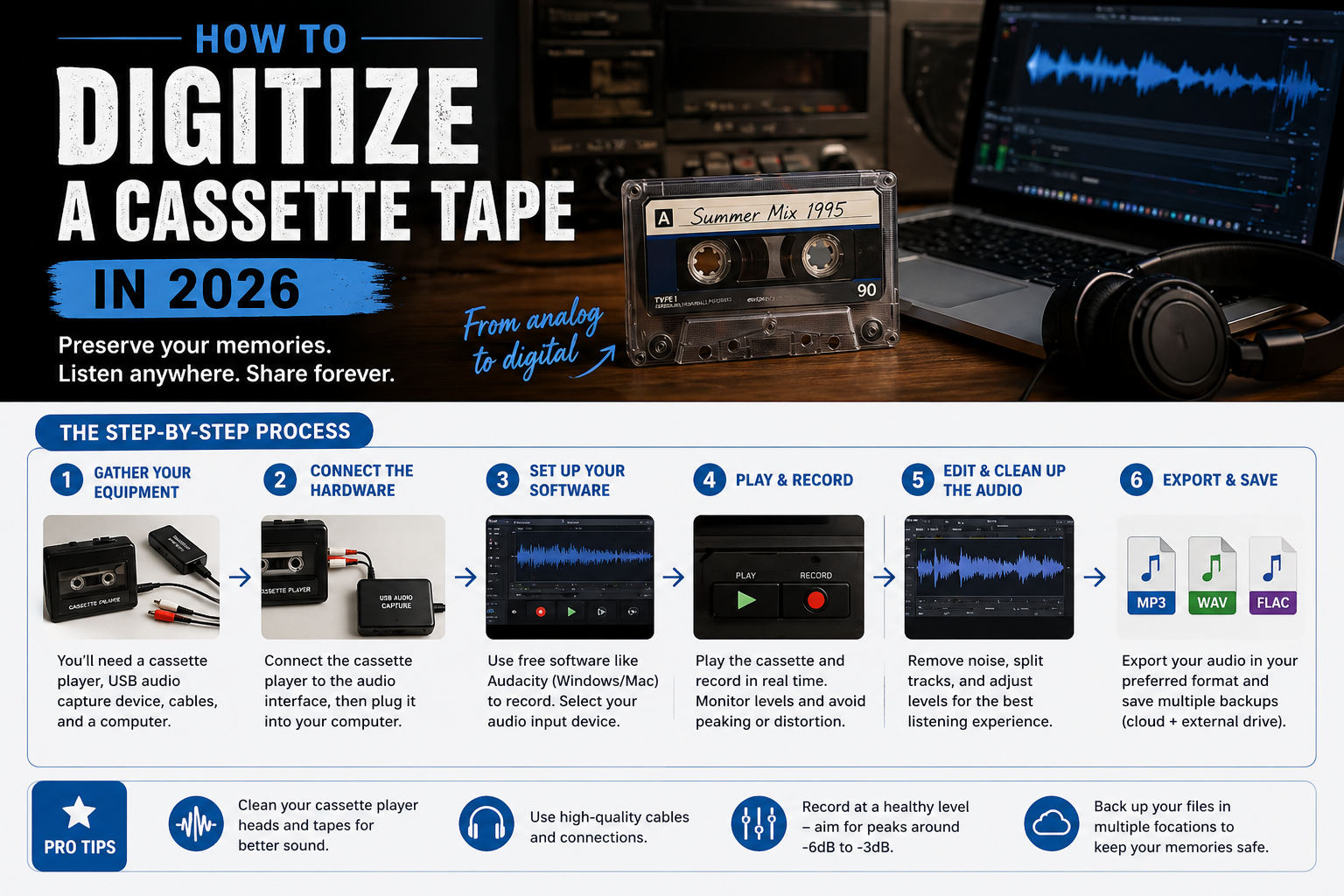
If you want to know how to digitize a cassette tape the right way, it’s not just about “getting sound into a computer.” It’s preserving a fragile analog recording with the least damage, the least noise, and the fewest avoidable mistakes. That matters whether the tape holds a one-of-one rap demo, archived sermons, old interview audio, or a full indie release you want to bring back as a CD or download.
The good news is that cassette transfer is still very doable at home. The bad news is that cheap hardware, bad level setting, and worn tape paths can ruin a transfer fast. The right method depends on what the tape means to you, how much quality matters, and whether you want a simple listening copy or a master you can release.
Why Your Old Tapes Are a Ticking Time Bomb
A cassette can sit untouched for 30 or 40 years and still look fine on the outside. That tells you almost nothing about the condition of the recording. The weak point is the tape itself: magnetic coating ages, lubricants dry out, the pack can cinch or loosen, and an old shell can drag or bind the moment you press play.

I see the same mistake all the time. Someone finds an old demo, interview, sermon, or family tape, drops it into the nearest thrift-store deck or cheap USB converter, and assumes any sound coming through the speakers means the tape is safe. It doesn’t. A bad transport, dirty heads, or poor alignment can scrape oxide, mistrack the tape, or give you a transfer that is dull, unstable, and hard to fix later.
What usually fails first
Cassette damage often shows up as smaller playback problems before you get a total failure:
- Loss of high end from head alignment problems, dirty tape paths, or a worn pressure pad
- Dropouts where parts of the magnetic coating no longer play back evenly
- Wow and flutter that make voices and music drift sharp and flat
- Sticky or hesitant transport caused by age, storage conditions, or shell friction
- Squealing or shedding that points to physical stress during playback
Some of those problems come from the tape. Some come from the machine. That distinction matters, because a cheap player can make a decent cassette sound worse than it is. If the goal is a finished archive or even a release-ready master for CD or digital distribution, the first transfer should be as clean and controlled as you can make it.
A casual listening copy is one thing. A one-chance preservation transfer is another.
Why time matters
Compact cassettes were built for convenience and portability. They were never a great long-term storage format. Heat, humidity, dust, magnetic exposure, and years of uneven winding all work against stable playback. So does neglecting the deck that will play them back.
That is why I tell people to start with the tapes that cannot be replaced. The rare band rehearsal. The church archive. The spoken interview. The local radio aircheck. The self-released album that never made it past cassette. If you may want to restore it, sequence it, and turn it into a proper product later, treat the source like a master, not a throwaway copy.
If a tape is already shedding, binding, or sounding badly warped, stop. Continued playback can make the damage worse. That’s the point where professional transfer is usually cheaper than losing the only surviving recording.
Choosing Your Digitization Path Three Core Methods
There isn’t one universal best way to digitize a cassette. There are three realistic paths, and each has a place. What matters is matching the method to the tape.

A lot of basic tutorials skip the hardest part. They assume you have a proper cassette deck with useful controls. In reality, many people only have a cheap portable player or an all-in-one USB unit. As the Canadian Heritage digitization guidance notes, many basic players don’t allow azimuth adjustment, which is a major reason people end up with weak signals or muffled transfers.
Method 1: Budget USB cassette converter
This is the fastest way to get audio off a tape with minimal setup. You buy a cassette-to-USB unit, connect it to a laptop, install the included app or use Audacity, and record in real time.
This route works best when the tape is low stakes and the goal is convenience. If you’re digitizing a spoken-word reference copy, a rough rehearsal, or a tape you mainly want to hear again, it can be enough.
What doesn’t work well is expecting premium sound from budget transport hardware. Cheap units often have inconsistent speed, weak output, and noisy electronics. If the transfer sounds dull, thin, or unstable, the problem may not be the tape. It may be the player.
If your tape matters and the USB unit is your only machine, do a short test first. Don’t commit the whole cassette until you know the machine is playing at a stable speed and giving you usable tone.
Method 2: Cassette deck plus audio interface
This is the best DIY balance for most musicians, DJs, churches, and small studios. You use a real cassette deck for playback and feed its output into a computer through an audio interface.
It takes more effort. You need the deck, the right cables, software, and a little setup discipline. But you get better transport stability, cleaner output, and more control over levels.
This is the route to choose when:
- The tape has release value and might become a CD, archive master, or catalog asset
- You care about fidelity and don’t want to re-do the transfer later
- You’re handling multiple tapes and need consistency across the project
Method 3: Professional transfer service
Some tapes shouldn’t be your test project. If the shell is cracked, the transport drags, the tape squeals, or the recording is one of a kind, professional transfer is the safer call.
A good service has maintained playback decks, calibration know-how, and a workflow built around preservation instead of guesswork. That matters most for old masters, church archives, rare mixtapes, and anything that would hurt to lose.
Professional transfer also makes sense when your time is the bottleneck. Real-time capture takes time no matter what gear you use. If you have a stack of tapes and a release deadline, outsourcing can be the more practical option.
Digitization Method Comparison
| Method | Estimated Cost | Audio Quality | Effort Level | Best For |
|---|---|---|---|---|
| Budget USB cassette converter | Lower cost | Basic to fair, depends heavily on player quality | Low | Casual listening copies, low-stakes tapes |
| Cassette deck plus audio interface | Moderate investment | Strong DIY quality with good control | Medium | Artists, DJs, churches, and creators who want dependable masters |
| Professional digitization service | Higher than DIY | Best option for consistency and fragile tapes | Low for you | Important archives, damaged tapes, release-critical material |
A simple decision filter
Use the budget route if you’d be okay with “good enough.”
Use the deck-and-interface route if you’d be annoyed by hiss, clipping, speed drift, or muddy high end.
Use a pro if the tape is valuable enough that one bad pass would bother you for years.
That’s the core trade-off. Not hype. Just risk versus control.
The High-Fidelity DIY Setup Gear and Software
A good transfer starts with the playback chain. If the deck runs slow, wobbles in pitch, or spits noise into the signal, the computer will capture those flaws faithfully. That is why cheap USB cassette gadgets disappoint so many people. They are built for convenience, not for preserving a tape you may want to archive, edit, sequence, and press to CD later.

Start with the right playback machine
Use a real cassette deck if you can. A home deck from a decent hi-fi line will usually give you better speed stability, better head alignment, and cleaner outputs than the all-in-one USB units sold for quick transfers.
Brand matters less than condition. I would take a serviced mid-tier deck over a neglected “classic” model every time.
Look for a machine with:
- Stable playback with no obvious warble, dragging, or speed hunting
- Working RCA line outputs
- Functional transport controls that respond cleanly
- Tape type and Dolby settings if your collection includes tapes recorded that way
- A clean tape path with no visible residue or hardened pinch rollers
Pass on decks with sluggish buttons, inconsistent speed, crackling outputs, or any sign that the transport is struggling. If a machine eats one tape, it can ruin the transfer and the source at the same time.
Use an audio interface instead of the computer’s mic jack
The deck should feed a proper line input. The mic input on a laptop or desktop is the wrong tool for this job. It often adds noise, overloads easily, and can sum the signal in ways you do not want.
A basic audio interface is the practical middle ground between bargain-bin USB cassette converters and a fully professional transfer room. You get cleaner analog-to-digital conversion, proper input gain control, and a more dependable capture path. That matters if the goal is more than a casual listening copy. It matters even more if you plan to edit the transfer, split tracks, master it, or turn it into a finished release.
Common choices in this tier include entry-level Focusrite, PreSonus, MOTU, and similar interfaces with true line inputs. You do not need a fancy studio rig. You do need hardware that was designed to record line-level audio cleanly.
Keep the signal path simple
The cleanest home setup usually looks like this:
- Cassette deck line-out
- RCA cable or RCA-to-quarter-inch cable
- Audio interface line input
- Computer with recording software
- Headphones for monitoring
Short, solid cables beat a pile of adapters. Every extra connection is one more place for hum, crackle, or channel loss to show up. If your interface only has combo inputs, make sure you are setting them for line level, not instrument level.
Reliable software
Audacity is the easiest recommendation. It is free, stable, and fully capable of capturing cassette transfers at a quality that makes sense for archiving and release prep.
A simple Audacity workflow lets you:
- Record an entire side in one pass
- Watch meters while you capture
- Drop markers at song starts
- Trim blank space and false starts
- Export WAV files for archiving and MP3s for listening
If you already work in Reaper, Logic Pro, Pro Tools, or Adobe Audition, use what you know. The software matters less than the discipline behind it. Stable recording, visible metering, organized filenames, and clean exports make a bigger difference than the logo on the screen.
Where the best value usually sits
For most DIY transfers, the sweet spot is not the cheapest setup and not a full mastering studio. It is a maintained cassette deck, a decent interface, good cables, and recording software you know how to use.
That setup gives you a transfer you can keep, restore, sequence, and hand off for duplication if the project grows into something bigger. If you are preserving demos, live recordings, church messages, family tapes, or an old independent release that deserves a proper second life, this is the level where DIY starts making sense.
Capturing the Perfect Digital Copy Recording and Calibration
A lot of disappointing transfers are ruined in the first five minutes. The deck is dirty, the wrong noise reduction setting is engaged, the input gain is pushed too hard, and by the time anyone notices, the tape has already made one rough pass.

If the goal is more than casual listening, and you may want to clean the audio up, sequence it, or press it to CD later, the capture has to be disciplined. Restoration can fix some problems. It cannot restore detail that a bad playback chain never captured.
Start with the deck, not the record button
Clean the tape path before any important transfer. Heads, capstan, and pinch roller pick up oxide and residue over time, and cassette playback gets dull fast when that buildup is ignored.
Use high-purity isopropyl alcohol on lint-free swabs for the metal parts. Be careful around rubber. Some technicians use a rubber cleaner for the pinch roller instead of alcohol because repeated alcohol use can dry it out. If you are not sure what your deck tolerates, check the service manual or stop at a dry wipe and get advice before you damage a hard-to-replace part.
Give everything a minute to dry. Then run a sacrificial tape, not your irreplaceable master, just to confirm the transport is behaving normally.
Check the cassette before a full pass
Old shells cause plenty of trouble on their own. I usually fast-forward and rewind once before transfer if the tape moves freely. That can even out the pack and reduce drag on a cassette that has been sitting for years.
Stop if you notice any of the following:
- Cracked shell
- Missing screw or loose half
- Collapsed or missing pressure pad
- Wrinkled tape
- Squealing, sticking, or heavy resistance
That is the point where brute force gets expensive. A damaged shell may need to be rehoused, and a tape that is binding can be safer in the hands of a specialist with the right donor parts and transport options.
Match playback to the original recording
A cassette transfer only sounds right when playback matches the tape as closely as possible. If the tape was recorded with Dolby B or Dolby C and you play it back without the matching setting, the result is usually too bright, thin, or oddly pumpy. If you engage Dolby on a tape that was not encoded with it, everything can turn dull and lifeless.
Tape type matters too. Better decks let you set normal, chrome, or metal playback properly. Cheap USB cassette players usually remove those choices entirely, which is one reason they are fine for convenience but weak for preservation or release prep.
Azimuth matters as well. If your deck allows head adjustment and you know what you are doing, small azimuth corrections can recover top end and improve mono compatibility. If you do not know what you are hearing, leave the screwdriver alone. It is easy to make things worse.
Choose a capture format based on the end use
Set the format before recording so you do not have to redo work later.
For a project that may end up on CD, 44.1 kHz WAV keeps the path simple. If your interface and software support it, I still prefer recording at 24-bit rather than 16-bit because it gives more headroom for safe level setting and later cleanup. You can make a 16-bit CD master at the delivery stage.
For archival work, 24-bit WAV is the better default. Some engineers capture at 48 kHz, some at 44.1 kHz. Either can work well for cassette. The bigger quality difference usually comes from the deck, alignment, and level discipline, not from chasing sample-rate arguments on a source that already has limited bandwidth.
That budget-versus-quality trade-off matters. A well-played tape captured cleanly at 24-bit on a good deck will beat a sloppy transfer made at a higher setting on a cheap machine every time.
Set levels for headroom, not loudness
Cassette has hiss. That makes people nervous, and beginners often respond by recording too hot. The result is clipped peaks, crunchy transients, and a transfer that is harder to restore than it needed to be.
Do a short test capture from the loudest section you can find. Watch both channels. Set gain so strong peaks stay safely below full scale, with room for an unexpected transient. In practice, that usually means leaving several dB of headroom instead of trying to fill the meter.
A transfer that looks slightly conservative is usually the right one.
Monitor on headphones during the test pass and listen for hum, intermittent crackle, or one channel arriving lower than the other. Those problems are easier to solve before the actual capture starts.
Capture clean and a little conservative. Loudness can be adjusted later. Clipping cannot.
Record each side in one uninterrupted pass
Keep the process boring. Boring is good here.
- Open a new session and confirm the correct input.
- Set your sample rate and bit depth before recording.
- Cue the tape a few seconds early.
- Run a test section and adjust gain.
- Listen on headphones for the first part of the transfer.
- Record the full side without stopping unless the tape or deck shows a real problem.
- Save the raw file immediately with a clear name, such as
BandName_DemoTape_SideA_raw.wav.
Record the whole side as one file, even if there are multiple songs. That gives you a true preservation master and makes later editing cleaner. It also helps if you eventually decide to turn the transfer into a finished product rather than a one-off backup. A duplication house or mastering engineer can work more reliably from full-resolution raw captures than from chopped-up files with uncertain edits.
Here’s a walkthrough if you want to see the process in action before you set up your own transfer:
Listen for problems that require a stop
Meters do not tell the whole story. Your ears catch the issues that often separate an acceptable home transfer from one worth using for a release.
Listen for:
- Pitch wobble or warble
- A left-right level mismatch
- Harsh digital clipping
- Sudden dullness or loss of highs
- Mechanical noise from the shell or transport
- Dropouts that suggest tape damage or contamination
If the tape is struggling, stop and reconsider the machine. One careful pass on a better deck is often smarter than finishing a compromised transfer on a cheap player just because it is already connected. That is the line many DIY guides skip. Convenience gear can get audio into a computer, but it often falls short when the goal is an archive master or a transfer you can confidently take into restoration, mastering, and disc production.
Post-Production Polishing and Organizing Your Audio
The raw capture is only the halfway point. You still need to turn that file into something easy to find, easy to share, and solid enough to use later.
Clean up gently, not aggressively
A cassette transfer shouldn’t come out sounding sterilized. The point is to preserve the content, not erase every trace of the medium.
In Audacity, the common cleanup moves are straightforward:
- Trim dead air at the beginning and end
- Split tracks if the tape contains multiple songs or sermon segments
- Apply light noise reduction only if hiss is distracting
- Fix obvious channel imbalance if one side came in lower
Be conservative with noise reduction. Overdoing it gives you that watery, phasey, under-a-blanket sound that screams “bad restoration.” If the source is a mixtape or live room recording, a little tape hiss is often less offensive than heavy-handed cleanup.
A clean transfer still needs to sound like the original tape, just on its best behavior.
Keep masters separate from listening copies
Make one folder for untouched masters and another for edited exports. That habit prevents accidental overwrite and gives you a fallback if you regret an edit later.
A practical folder structure looks like this:
- Masters
- Full side captures as WAV
- Edits
- Split tracks, cleaned versions, fades
- Delivery
- MP3, CD-ready WAV, or files prepared for upload
- Artwork and notes
- Scans, tracklists, insert text, tape photos
If you’re archiving for a church, indie label, or family collection, include text notes about what the tape is, who recorded it, and anything unusual about the transfer.
Name files like you’ll need them again
The biggest batch-transfer mistake isn’t technical. It’s naming files badly.
The workflow advice summarized by this article on cassette transfer organization stresses the importance of spreadsheets and standardized file naming for larger projects. That’s especially useful when you’re handling sermon series, DJ sets, interviews, or a label back catalog.
Use naming that stays readable and sortable. For example:
- artist-project-side-a-master.wav
- churchname-sermon-title-date-master.wav
- djname-mixtape-title-track-01.wav
If you have more than a few tapes, create a spreadsheet with fields like tape label, date on shell, transfer status, playback notes, file name, and any damage observed. That saves a lot of confusion later.
Split tracks with purpose
For music tapes, track splitting is where the transfer becomes usable. Mark starts and ends manually if the tape has crowd noise, DJ drops, or uneven gaps. Auto-detection can help, but it often misreads transitions on old cassettes.
For spoken-word archives, think in segments instead of songs. A sermon intro, message, prayer, and announcement section may deserve separate files if people will revisit them individually.
Export the right formats for the right job
Use WAV for your masters and serious production files. Use MP3 for easy sharing.
If you plan to burn CDs later, keep a clean set of CD-ready WAV files in order. If you’re only sending previews to bandmates or church staff, MP3 copies are fine for convenience. Just don’t make the MP3 your only surviving version.
Metadata matters too. Add artist, title, year, and track names where appropriate so the files don’t show up as anonymous chaos in music players and media libraries.
When to Call the Pros and What Comes Next
You find a cassette that matters, maybe the only copy of a live set, a parent’s voice, an early demo, or a church recording that was never archived properly. You load it into a bargain deck bought online, press play, and the transport wobbles, the pitch drifts, or worse, the machine starts chewing tape. That is the point to stop treating the transfer like a casual DIY project.
Home transfer works well when the tape is in decent shape, the recording is replaceable, and your playback chain is trustworthy. A solid deck, clean heads, stable speed, and a proper audio interface can get you a very good archival file. You also get control over levels, track breaks, and how much cleanup to apply.
Professional help makes more sense when the risk goes up or the end use gets bigger.
- The cassette is rare, fragile, or irreplaceable
- Your deck has unstable speed, weak channels, or transport problems
- The shell is cracked, warped, or dragging
- You need multiple tapes transferred to a consistent standard
- You want files that can hold up for mastering, duplication, or release prep
The weak point in a lot of DIY advice is the playback gear. Cheap USB cassette converters and random thrift-store decks often add noise, smear transients, drift in speed, or have poor head alignment. You may still get sound off the tape, but not the best version of what is present. For a reference copy, that might be acceptable. For a CD release, a merch item, a church archive, or a label reissue, it usually is not.
Waiting also carries its own risk. Old cassette machines fail progressively. Belts soften, pinch rollers glaze over, capacitors age, and a deck that worked last year can become unreliable fast. The tape itself does not get stronger with time either.
A good transfer is only the midpoint.
Once the audio is captured properly, it can move into real-world formats people can use. Bands can turn recovered demos into a short-run CD. DJs can revive old mixtapes for a cleaned-up physical release or promo item. Churches can organize sermon archives into discs or digital handouts for members. Labels can take rescued catalog material and prep it for duplication, artwork, inserts, and distribution.
That broader path matters. Digitization preserves the content. Production turns it into something shareable, searchable, and ready for an audience.
If you have clean files and a clear plan, Atlanta Disc can help you turn a transfer into a finished product. They handle short-run CD duplication, packaging, printed inserts, download and streaming cards, and related print pieces for artists, DJs, churches, indie labels, and creators who want restored cassette audio to live somewhere better than a hard drive.